


Made in Germany · ISO 27001 · GDPR-compliant
Approval Workflows for Training Requests
Efficient Approval Workflows for Your Continuing Education
Whether it’s mandatory compliance training, a fee-based specialized seminar offered by an external provider, or an easily accessible online course—not every continuing education program requires the same approval process. Overly bureaucratic structures hinder the willingness to learn. A lack of oversight jeopardizes the budget and compliance documentation.
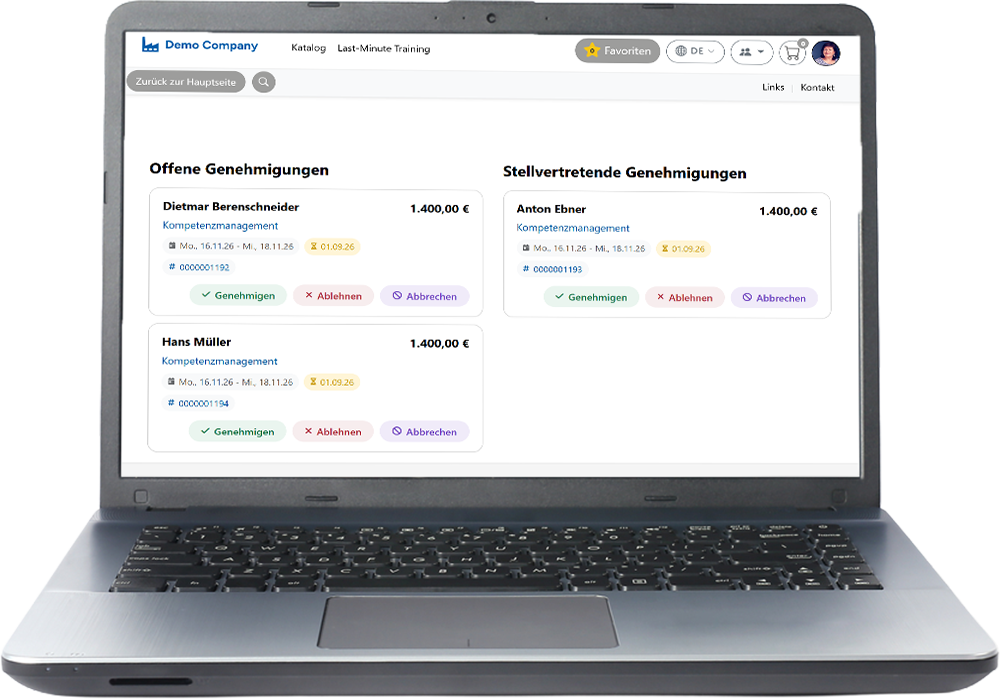
SoftDeCC offers configurable approval workflows for internal and external training programs—with multi-level approvals, automatic budget checks, and traceable documentation. This feature is available in both the LMS and the seminar management system, regardless of whether it is an online course or a booked in-person event.
Training Authorization
Automated & Digital
Escalation


Digital Process Support in Corporate Learning
Flexible Workflows for Demanding Training Organizations
Training organizations face a dual challenge: actively promoting continuing education while simultaneously managing budgets, compliance requirements, and planning certainty. Effective skills management requires that approvals be granted quickly, in accordance with regulations, and in a traceable manner.
Flexible approval processes play a key role in this regard: They enable quick, tailored, and transparent decisions regarding continuing education initiatives—without unnecessary delays or administrative hurdles that prevent employees from learning.
Managers and HR teams can customize when approvals are required—for example, for high-cost in-person training, external educational programs, or mandatory compliance training. For digital learning opportunities or low-barrier topics, approval processes can be streamlined accordingly to make participation easier.
A modern approval workflow can also include absence policies, escalation levels, and budget reviews, ensuring that important training initiatives are approved quickly and smoothly, even in complex organizations.
Variations and Examples
Approval Workflows for Internal Training Programs
Participation in Internal Training Sessions Without Prior Approval
Employees can easily access certain internal training courses without needing additional approval, especially when it comes to low-barrier online offerings. This increases participation and fosters a culture of learning within the company.
Tacit approval from management
For certain training requests, the manager can give “tacit approval.” After being notified of the request for continuing education, they can raise objections within a specified time period. If there is no response, the request is automatically approved—ideal for efficient and unbureaucratic processing.
Simple approval process with just one click
For more expensive or resource-intensive courses, managers can approve or deny participation with a single click, thereby ensuring targeted and transparent budget management.
Cloud or on-site?
Approval Workflows for External Courses and Training Sessions
For external training—such as professional development courses offered by third-party providers or compliance certifications—SoftDeCC offers specialized approval processes. Employees can submit their training requests directly through the learning portal by filling out a form with all the relevant course information:
Detailed course information provided by staff
Employees enter the type of training, content, date, duration, price, and other details in the application form. A course description in PDF format or a URL with additional information can be linked directly.
Automatic Forwarding and Review by Management
As soon as the request is submitted, the responsible manager or the HR department is notified and can review and approve the request directly in the system.
Multi-step approval processes for external requests
For external processes that require multiple approval levels, multi-step workflows can be configured—for example, so that multiple decision-makers must review a request or so that approval must be granted by at least one of several authorized individuals.
Substitution Policies and Escalation Procedures in Case of Absence
If the approver is absent, a designated substitute is automatically notified. If the substitute also does not respond, the request is escalated and another person is notified—this helps prevent delays.
Deep System Integration
Training budget in the approval process
Approval decisions made without an overview of the budget often result from a lack of system access—leading to unnecessary follow-up questions and delays. SoftDeCC resolves this by directly integrating continuing education budget information into the approval process.
Automatic Display of Budget Status
As soon as an approval request is submitted, SoftDeCC displays the current status of the relevant training budget. The manager can immediately see whether the budget for the department, employee, or business unit has been exhausted.
Reporting Tools for Budget Monitoring
A comprehensive reporting tool gives managers insight into the training budget and its current usage at any time—making it easier to plan future initiatives.
Transparent and Accountable Use of the Budget
Being able to review budget information in real time ensures transparent and well-documented continuing education planning.
Highlights
Verification and Recognition of Qualifications Obtained Externally
After completing an external training program—such as a certification course, a conference, or mandatory compliance training—employees submit their new qualifications to SoftDeCC so that they can be officially recognized and saved in the qualifications overview.
Uploading Proof of Participation and Completion
Employees can upload documents such as certificates of participation or completion documents directly through the portal. These are saved in their profile and can be accessed at any time.
Review and approval by a manager or HR
Internal cost centers, external invoices, vouchers — all billing models are covered.
Clear Overview and Documentation
By ensuring that qualifications are seamlessly linked to continuing education programs, competency development remains transparent and understandable to all involved.
Get a free consultation now
Ready for flexible workflows in corporate learning?
In this 30-minute session, we'll show you how to set up and automate the processes for your training organization.
✓
Over 25 Years of Expertise
✓
Made in Germany
Frequently Asked Questions