

Made in Germany · ISO 27001 · GDPR-compliant
Corporate Media Library: Knowledge at Your Fingertips
Make corporate knowledge available at any time—without registration, reservations, or detours.
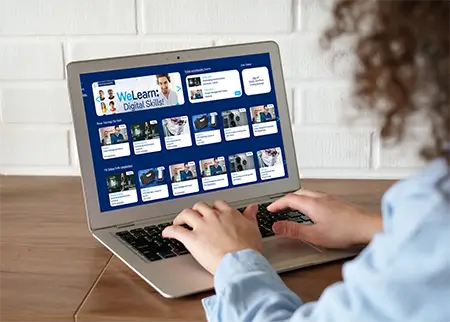
The SoftDeCC media library brings together videos, podcasts, and other company media in one central location. Employees can quickly find relevant content using search, filters, and recommendations—right from their desktop, tablet, or smartphone.
Whether it’s a product video, an explanatory video, or an interview: knowledge is available exactly when you need it. This is how the Media Library complements your LMS and LXP by providing easy access to informal learning and informational content.
From a centralized media library to intelligent search: SoftDeCC makes corporate knowledge easy to find and accessible at any time.
Videos, podcasts, documents
Self-Service
Direct Access
On-Demand Learning
Media Library: Knowledge on Demand
Not every learning need warrants formal training. A short explanatory video about the new machine, a podcast interview with senior management, a product snippet before a client meeting—content like this should be easily accessible without having to sign up for a course or go through an approval process. The SoftDeCC Media Library makes exactly that possible: a central, always-accessible collection of all company media.
Why Have a Media Library?
Advantages and Benefits of a Corporate Media Library
✓
Easy Access: Employees can access media (videos, podcasts, etc.) at any time without having to log in or make a reservation.
✓
Time savings: No organizational hurdles; ready to use right away.
✓
Responsive Design: Optimal viewing on desktops, tablets, and smartphones.
✓
Smart Navigation: Filter, search, and sort functions make it easy to quickly find relevant content
✓
Content Recommendations: Automatic suggestions for related media increase discoverability and usage.
✓
Central Repository: All corporate media in one place, ensuring consistent availability and up-to-date content.
✓
Promoting Knowledge & Learning: Quick access to training, informational, and communication materials.
✓
Increasing employee retention: Independent access to engaging content boosts engagement.
Functions of a Media Library
Features at a Glance
The decision to use a media library affects the overall architectural considerations of the course offerings:
Media Library in Practice
✓
Onboarding Supplement: New employees watch instructional videos about processes and tools at their convenience, in addition to the structured onboarding learning path.
✓
Sales and Field Service: Product videos and briefings are available before customer meetings, even on mobile devices.
✓
Field Service: Technicians can access maintenance and repair videos directly on-site using the responsive view.
✓
Corporate Communications: Interviews, town hall recordings, and podcasts featuring senior management are available in one central location.
✓
Supplement to compliance training: In-depth explanatory videos in addition to the actual mandatory training in the LMS, for which proof of completion is required.
Distinctions and Differences
Media Library, LMS, or LXP—what's the difference?
All three components complement each other, but they address different problems.
The Media Library replaces neither the LMS nor the LXP—it bridges the gap between the two: content that doesn't require mandatory training or personalized recommendations, but simply needs to be easy to find.
SoftDeCC Authoring Tool
The Media Library thrives on up-to-date, relevant content. With SoftDeCC Authoring, departments and training managers can create their own explanatory videos and educational media directly in the browser—without any programming knowledge, without installing separate software, and with optional AI support for media creation and quality assurance. Finished content can then be made available in the Media Library and linked to relevant LMS learning content using the linking feature.
Checklist
Is a media library worth it for your business?
☐
Is there any content (explanatory videos, interviews, product information) that is currently scattered or hard to find?
☐
Should employees be able to access knowledge resources without having to go through a sign-in or booking process?
☐
Is content needed on the go or in the field, without access to a traditional office computer?
☐
Should the link to structured learning content in the LMS be maintained without requiring everything to be approved?
Get a free consultation now
Ready to share your knowledge with your employees?
Would you like to give your employees the ability to find relevant information quickly and efficiently? In just 30 minutes, we'll show you how the SoftDeCC Media Library makes expertise available quickly and efficiently.
✓
Over 25 Years of Expertise
✓
Made in Germany
Frequently Asked Questions
FAQs About the Media Library
References
What Our Customers Say
Quality & Reliability
YASKAWA has been a customer and user ofTCmanager® since 2015. After an extensive search for a management tool for our training and continuing education division, we are now, following its implementation, glad that we chose SoftDeCC. It quickly becomes clear that this software was specifically designed for training and qualification management. We’re discovering far more capabilities than we initially required or expected. We’re confident thatTCmanager® will help us position our training programs well for the future and improve our efficiency and quality.
Torben Schäfer
Manager, YASKAWA ACADEMY
YASKAWA Europe GmbH
A Reliable Partnership
TCmanager LMS offers everything you would expect from a software tool for training centers. Today, our extensive training offerings for our service and sales partners and customers are optimally supported worldwide by training portals tailored to specific target groups and countries. The management of schedules, bookings, and resources is logically structured and intuitive to use. Reports can be generated quickly and clearly at any time. SoftDeCC is our reliable partner, with whom we will continue to deliver our in-person training and e-learning offerings in the future.
Julia Tillmann
Head of the Training Center,
Maschinenfabrik Bernard Krone GmbH & Co. KG

Support, Customizations, New Features
Hella Academy provides technical training to repair shops and retail partners on our products, as well as on specialized topics such as “Hybrid & High-Voltage” and driver assistance systems. We have been a satisfied customer and user of the TCmanager® LMS since 2015. We are particularly impressed by the support time and again. Any customizations or new features we request for the application’s functionality are implemented smoothly and help us better serve our customers.
Mark Schulte
Head of Training,
Hella Gutmann Solutions GmbH